Client Reporting & Billing

White label reporting that ends with you getting paid.

Log the work once. It becomes the client report, the portal your client logs into, and the invoice they pay by card — on your logo, your colors, your name. Nobody else closes that loop.

Two things every agency does by hand, badly.

The monthly report is a screenshot of a rankings dashboard with a paragraph on top. It shows what the graphs did, not what you did — which is why clients who are ranking fine still churn. They never saw the work.

Then, separately, in different software, you try to remember what you did all month so you can bill for it. The invoice gets sent late, gets paid later, and the hours you actually worked were never written down anywhere in the first place.

AlmaSEO makes those the same act. Track a piece of work against a client and that single entry becomes two client-facing things: a line in the report that proves the work, and a line item on the invoice that charges for it. One source, both artifacts, no retyping.

For the freelancer chasing an invoice — and the agency with a churn problem.

For the solo SEO or freelancer

You did the work. Getting paid is the other job.

You finish the month, then spend an evening reconstructing what you did, writing it up, building an invoice somewhere else, sending it, and then asking for it again in three weeks. The work was the easy part.

  • Time tracking is free on every plan — start there
  • Tracked hours become invoice line items in one click
  • Reminders chase the invoice on your schedule, not your nerve
For the agency

Clients don’t churn because rankings dropped.

They churn because nothing visibly happened. A branded portal where the month’s work is sitting there, itemized, in your colors, is the cheapest retention tool you will ever deploy — and it costs you no extra effort, because it’s built from the log you already kept.

  • A client portal on your logo and your brand colors
  • Reports that show deliverables, never your hours
  • Profit per client, measured against hours actually logged

One tracked minute, all the way through.

Follow a single logged entry from the timer to the money. Every step below is the same record, wearing a different hat.

Time tracking

Where the record starts — free on every plan.

A timer that runs while you work

Up to three timers going at once across different client sites, because that’s how the day actually goes.

Fifteen kinds of work, not just “SEO”

Phone calls, client meetings, research, DNS and hosting, competitor analysis, design, admin. The unglamorous hours are the ones clients forget you worked.

Log it after the fact

Forgot to start the timer? Add the entry with its duration and date. The record matters more than the ceremony.

Plan Free on every plan — including Solo.

Powered byWork categoriesDuration on any entryPer-site logsScreenshots on entries

Client Report Builder

The month’s work, written up for someone who isn’t technical.

Built from entries, not from memory

Pick the entries, group them by category, add a personal note at the top. The report writes itself out of what you logged.

Hide what shouldn’t be shown

Hide hours, hide dates, or both. Some clients should see effort; most should see outcomes. You decide per report.

Or make it look like a personal email

A plain style that reads like you sat down and typed it — no template, no letterhead. For the clients who’d find a designed report cold.

Failures never reach the client

Anything logged as an error is filtered out automatically. A retry you already fixed is not news your client needs.

Plan Pro and up.

Powered byCategory groupingPersonal noteRetainer summaryCC and BCCPreview before send

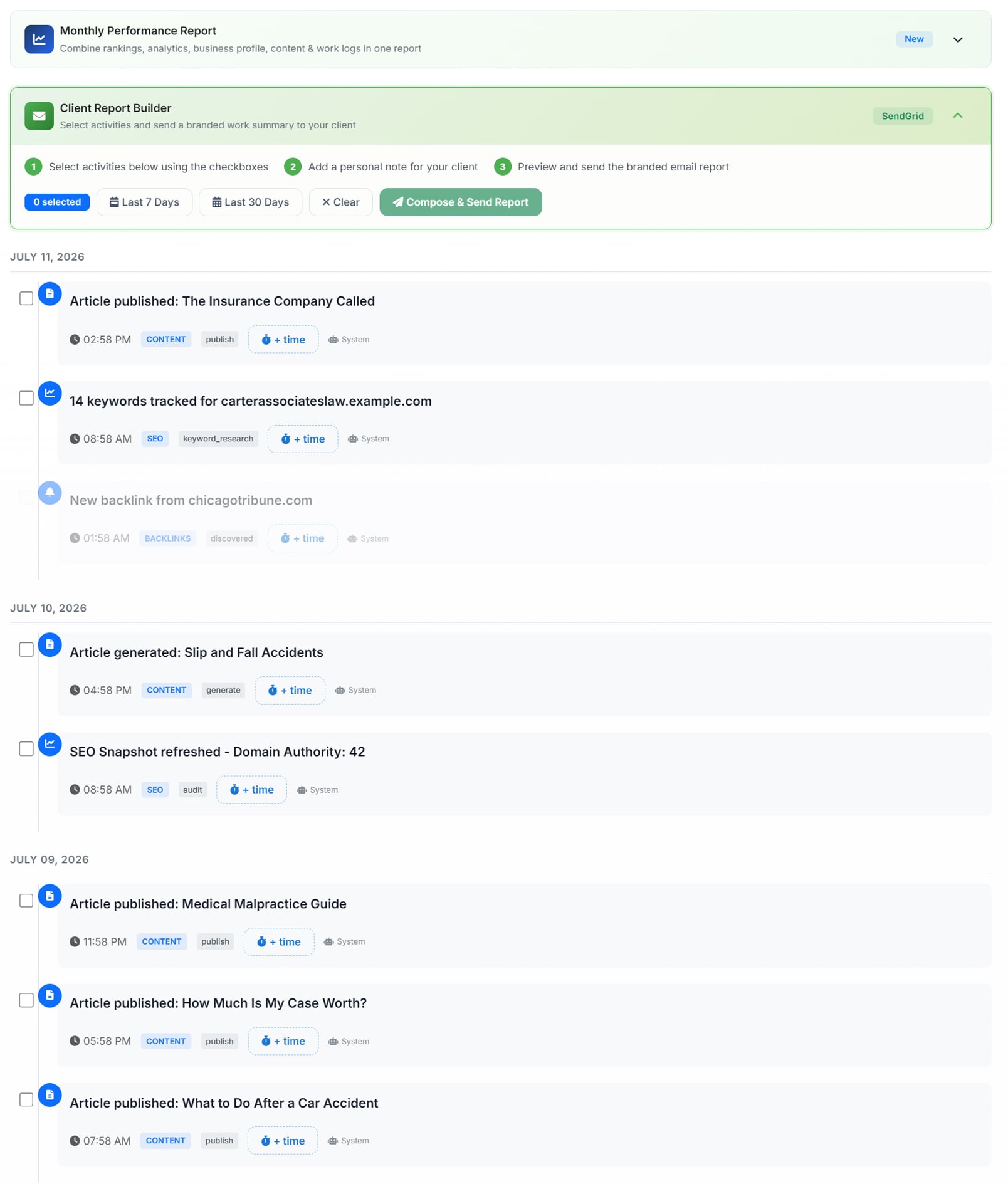
The Client Report Builder panel above an activity log: a three-step strip reading select activities using the checkboxes, add a personal note for your client, then preview and send the branded email report — with Last 7 Days, Last 30 Days and Clear filters beside a Compose & Send Report button; below it the logged work grouped by date, each entry checkboxed and tagged by category, showing published and generated articles, keyword tracking, an SEO snapshot refresh and a discovered backlink, each with an add-time control
Tick the work that belongs in the report — the same entries that end up on the invoice.

Client Portal

Your brand, your client, no login to forget.

Their own page, on your brand

Your logo, your primary and secondary colors, your business name. The client sees your agency — there is no AlmaSEO badge to pay to remove.

A link, not a password

One private link, no account to create, no password reset email six months later. Generating a new link retires the old one instantly.

It cannot leak your hours

Hours are force-hidden on every report published to the portal — not a checkbox you might forget, a rule the portal enforces. Your margins can’t escape by accident.

Plan Agency.

Powered byReport archiveInstant revokePortal-only publishingBrand colors

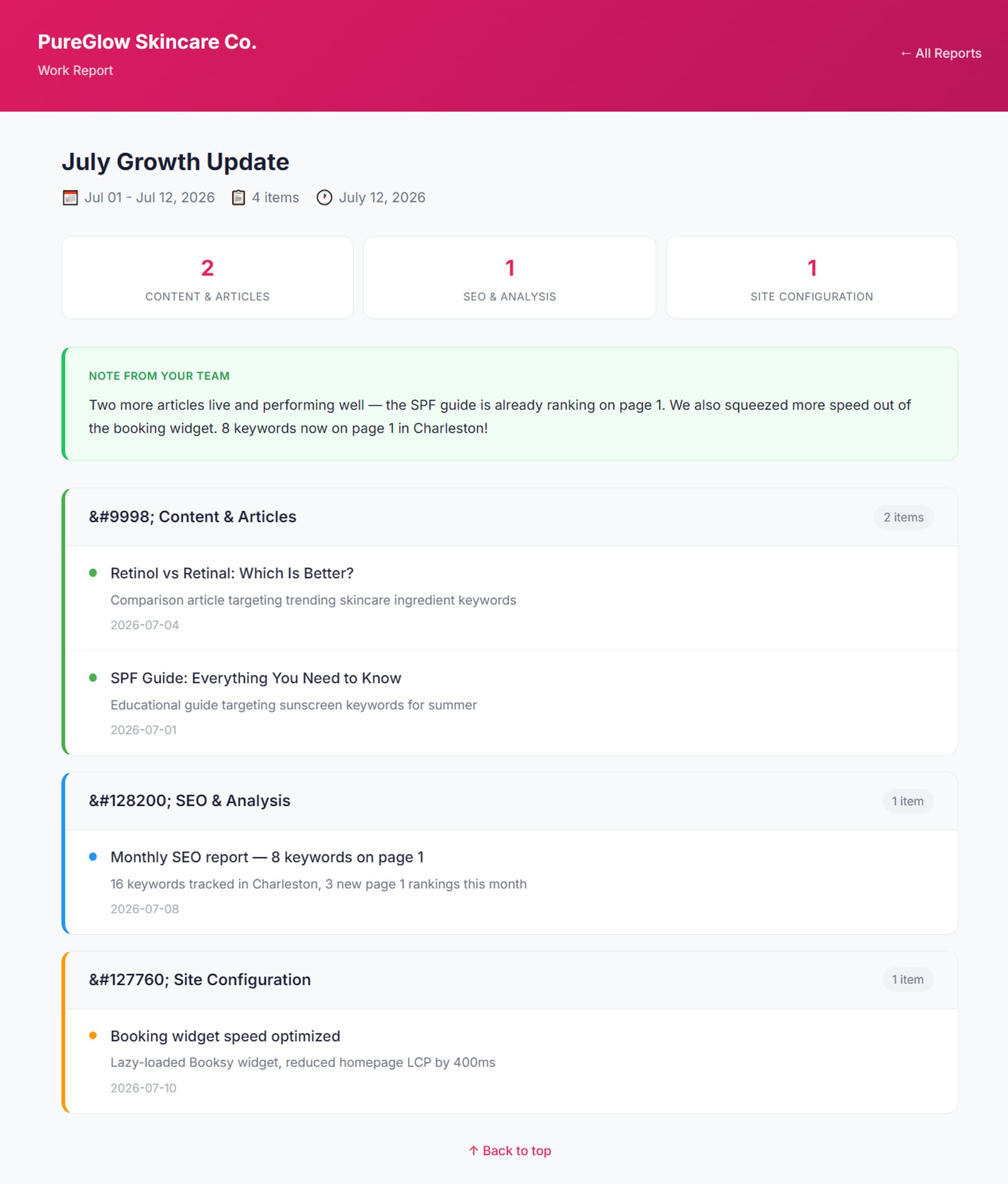
A client portal branded for a skincare business: a deep pink header carrying the client's own company name above a work report titled July Growth Update, with its date range, item count and report date; three count tiles for content and articles, SEO and analysis, and site configuration; a highlighted note from the team summarising the month in plain language; and each category listed below with the individual pieces of work, each showing what was done and the date it happened — with no hours shown anywhere and no AlmaSEO branding on the page
The client's own branded page — the month's work, itemised, with your hours nowhere in sight.

Retainers and profitability

Whether the client is actually worth what you charge.

Retainer pacing

Hours agreed against hours burned, on your billing cycle — whichever day of the month that starts on. Overage can roll forward or be written off at close.

Profit per client

Retainer revenue measured against the hours you actually logged, per client and across the whole book. The client who feels fine and is quietly losing you money shows up here.

It watches the workload too

The same hours feed pacing and workload signals, so an account quietly eating your week gets noticed before you burn out on it.

Plan Retainer tracking is Pro. Cross-client profitability is Agency.

Powered byBilling cycle dayOverage rolloverPeriod closePortfolio roll-up

Invoicing

Where the tracked hours turn into money owed.

Hours become line items

One modal turns the work you logged into billable line items, priced at the rate implied by the retainer. Grouped or itemized, your call.

Your invoice, not ours

Your logo on the PDF, your business name, your reply-to address, your invoice numbering. The client never learns what software you use.

Recurring, and it runs itself

Weekly through annual. The invoice regenerates on schedule, copies its line items, and sends itself if you want it to.

Plan Pro and up.

Powered byPDF attachedDiscounts and taxExpensesRevenue summaryVoid and waive

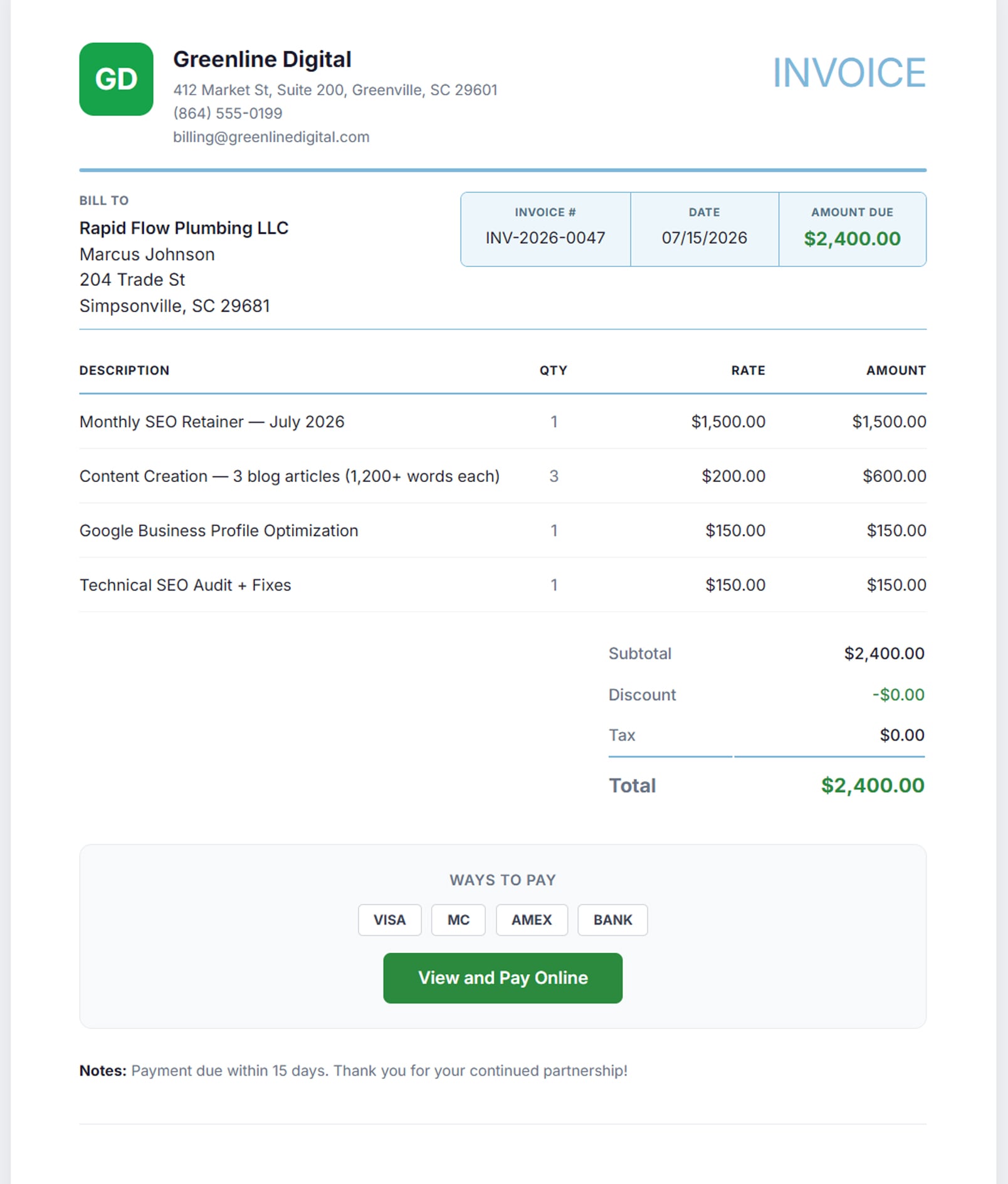
An invoice from an agency called Greenline Digital: their own logo, address, phone and billing email in the header, billed to a plumbing client, with an invoice number, date and amount due of $2,400; line items for a monthly SEO retainer, three blog articles, Google Business Profile optimization and a technical SEO audit, each with quantity, rate and amount; a subtotal, discount and tax breakdown; and a Ways To Pay panel listing Visa, Mastercard, Amex and bank, above a View and Pay Online button — with no AlmaSEO branding anywhere on it
The agency's invoice — their logo, their numbering, their client. Nothing on it says AlmaSEO.

Getting paid

The part most SEO platforms leave to somebody else.

The money is yours, directly

Connect your own Stripe account and client payments settle into it. AlmaSEO never sits between you and your revenue.

A pay page with no login

Your client clicks the link in the invoice email and pays by card. No account, no portal, no friction between them and paying you.

Card on file and autopay

A client can save a card once and stop thinking about it. Recurring invoices then collect themselves.

It chases the invoice for you

Reminders before and after the due date on a schedule you set, and late fees applied automatically — flat or percentage — with a one-click waive when you’d rather be generous.

Plan Pro and up.

Powered byYour own Stripe accountCard paymentsAutopayDunning scheduleLate fees

There is no “Powered by AlmaSEO” to pay us to remove.

Most platforms print their name on your client’s report and then sell you the privilege of taking it off. AlmaSEO never puts it there. Fill in your business name and logo and the client-facing side is yours — at every plan that includes the feature, with no branding-removal upsell, because there is nothing to remove.

Your invoice carries your logo and your name.

The PDF, the email it’s attached to, the sender name and the reply-to address are all yours. Set your business name once — until you do, the invoice falls back to ours, which is the one place worth filling in on day one.

Your portal carries your colors.

Logo, business name, and both brand colors theme the client portal. Your client opens a page that looks like it belongs to your agency, because it does.

The payment page says Stripe, and that’s on purpose.

The only third-party name your client ever sees at checkout is the payment processor’s — and that one you want, because it’s the reason they feel safe typing a card number.

Exactly which plan you need, in one place.

No Data Credits are involved anywhere in this area — reports, invoices and payments cost nothing per use. The only question is the plan.

Free, on every plan

Time tracking and the activity log. Tracking the work is table stakes, so it isn’t behind anything — you can start keeping the record on the cheapest plan we sell.

Pro

The Client Report Builder, retainer tracking, invoicing and payment collection. This is the tier where the record you’ve been keeping starts producing client-facing artifacts and money.

Agency

The branded client portal and cross-client profitability. The two things you only need once you’re running a book of clients rather than a handful.

Reports are sent as email and published to the portal as a web page — the PDF in this area is the invoice. And every report is composed by you: AlmaSEO will run your invoices on a schedule, but it will never auto-send a client a report you haven’t read.

See the work become a report, then an invoice.

Open the demo, look at the logged work, and follow it through the report builder — the same entries that end up on the bill.